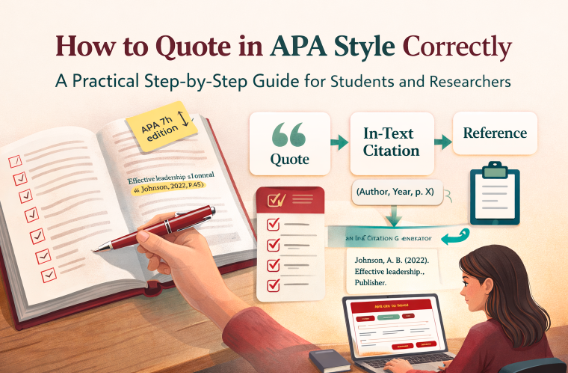
Block Quote Formatter (APA) — Write Long Quotes the Right Way, in Second
Paste your long quotation, add a citation if needed, and let the Block Quote Formatter instantly turn your text into a clean APA-compliant block quote. In a few clicks, you get correct indentation, proper citation placement, and a Word-ready format you can copy without breaking the layout. The tool removes formatting guesswork so you can focus on your argument, not the rules.
Block Quote Formatter (APA) — Instantly Format Long Quotes with Precision and Confidence
Academic writing often slows down not because of ideas, but because of formatting rules. One of the most common friction points appears when a quote becomes long enough to require a block quote. Students hesitate. Researchers double-check manuals. Writers lose momentum.
The Block Quote Formatter (APA) was created to remove that hesitation. It transforms a raw paragraph into a correctly formatted APA block quote instantly, so attention stays on content, not spacing or indentation.
Why Block Quotes Matter More Than You Think
A block quote is not simply a visual change. It signals precision and respect for sources. In APA style, a quotation of 40 words or more must be displayed as an indented block without quotation marks.
When formatting is wrong, even a strong paper can appear careless. When formatting is correct, credibility increases immediately. The reader subconsciously trusts the writer’s rigor.
What This Tool Actually Solves
Most users do not struggle with the concept of quoting. They struggle with the details:
- Where exactly should the indentation start
- Whether quotation marks should remain
- Where to place the citation line
- How many words count as a block quote
- How to paste into Word without breaking the format
The Block Quote Formatter answers all of these in one interface. It does not just format text; it guides decisions while formatting.
A Real-World User Scenario
Imagine a university student writing a literature review at midnight. The analysis is clear, the sources are solid, but a 75-word quotation suddenly appears. The student opens a new tab, searches APA rules, scrolls through blogs, compares examples, and loses ten minutes.
With the Block Quote Formatter, the same student pastes the text, sees the live word count, receives an APA hint, and clicks Format. The result is ready for Word in seconds. The workflow remains uninterrupted. The cognitive load disappears.
Features Designed for Actual Writing Habits
This tool was not built as a static formatter. It was designed around how people really write.
Live Word Count and APA Guidance
The moment text is pasted, the tool counts the words and indicates whether a block quote is appropriate. No manual counting. No guessing.
Automatic Cleanup
Extra quotation marks, irregular spacing, and unnecessary line breaks are automatically normalized while preserving the original wording.
Smart Citation Helper
Users can quickly add page numbers, paragraph references, or timestamps without memorizing abbreviations such as p., pp., or para.
Citation Placement Control
Some writers prefer the citation on the same line. Others prefer it on a new line. A simple toggle allows both.
Word-Ready Copy
The Copy to Word function preserves indentation and italics, preventing the common issue where formatting collapses after pasting.
Who Benefits the Most
Although anyone writing academically can use the tool, several profiles gain immediate value:
- University students preparing essays and dissertations
- Researchers managing multiple long quotations
- Content writers citing reports or interviews
- Non-native English speakers who want certainty in formatting rules
The common benefit across all profiles is the same: reduced friction and increased confidence.
More Than Formatting — It Supports Focus
Formatting errors are rarely intentional. They happen when attention shifts from meaning to mechanics. By automating the mechanical layer, the Block Quote Formatter protects mental energy.
Instead of wondering about indentation width, the user can refine argument structure. Instead of checking manuals, the user can strengthen analysis. The tool quietly handles structure while the writer handles substance.
A Small Tool With a Large Impact
The Block Quote Formatter does not replace writing skills. It amplifies them. It removes the invisible obstacles that slow down progress and turns a technical rule into a one-click action.
In academic environments where clarity and credibility define success, a correctly formatted block quote is more than a visual choice — it is a signal of professionalism.
This tool ensures that signal appears every time, effortlessly.
Block Quote Formatter (APA) — Quick User Guide
This tool is made for one moment every student (and researcher) knows too well: you paste a long quote into your paper, and suddenly you’re stuck wondering, “Do I need a block quote? Where does the citation go? Why does Word ruin the indentation?”
The Block Quote Formatter (APA) removes that friction. You paste your quote, add your citation, and the tool delivers a clean APA-style block quote you can copy with confidence.
1) Paste your quote
Copy the passage you want to use and paste it into Quote Text.
The tool automatically cleans up common issues (extra quotation marks, messy spacing), while keeping the wording exactly the same.
2) Let the word count guide you
You’ll see a live word count right away.
- If your quote is 40 words or more, a block quote is usually the correct APA choice.
- If it’s under 40 words, APA typically expects quotation marks instead.
No manual counting. No guessing.
3) Add your citation (recommended)
If you already have your citation, just paste it into the Citation field, for example:
(Smith, 2023, p. 15)(World Health Organization, 2022, para. 4)
This is the part that makes your quote academically “safe” and easy to verify.
4) Use the citation helper if you only know the locator
Sometimes you know the page number (or paragraph number) but you don’t want to think about the correct APA label.
That’s what the helper is for:
- Choose page → it inserts
p.orpp. - Choose paragraph → it inserts
para. - Choose timestamp → it keeps the video time format
Click Insert locator, and the tool drops it neatly into your citation.
5) Keep the indent (or adjust it if your school requires it)
APA’s default block quote indent is 0.5 inch, and the tool uses that by default.
If your professor or institution has a different requirement, you can change it in one field.
6) Decide where the citation should appear
Different teachers prefer different layouts, so you can choose:
- Same line: the citation appears at the end of the quote
- New line: the citation sits beneath the quote (clean and easy to read)
7) Click “Format Block Quote”
Once you click Format Block Quote, the preview updates instantly.
You’ll see exactly what you’re about to paste into your assignment.
8) Copy the version you need
You have three practical options:
- Copy Plain — quick text copy for any editor
- Copy HTML — useful if you publish online
- Copy to Word — best for Word users: it keeps indentation and italics so your layout doesn’t collapse
If you’re working on a dissertation or long report, Copy to Word is usually the smoothest option.
9) Reset and reuse
Click Reset when you want to start a fresh quote.
It clears everything so you can format the next passage quickly.
A good writing tip
Block quotes are most effective when you use them for something that truly deserves full visibility: a key definition, a powerful argument, or a piece of evidence you will directly analyze. The tool handles the formatting—your job is to make the quote matter in your paragraph that follows.
Block Quote Formatter (APA)
Advanced formatting: word count, smart citation helper, indentation controls, and Word-ready copy.
The tool removes leading/trailing quotation marks and normalizes spacing. Your wording remains unchanged.
You can type a full citation or use the helper below.
APA block quotes use a 0.5 inch indent as a baseline.
Use this if you only need the locator part for a quote.
Click “Insert locator” to append it to your citation field.
Your formatted block quote will appear here.