
Public Relations Budget Template in Excel, Fully Automated and Dashboard-Ready
The disciplined way to fund reputation, not just activities
Public relations rarely fails because teams lack ideas. It fails because good ideas are funded like impulse purchases: late, unevenly, and without a clear line between spending and outcomes. A Public Relations Budget Template fixes that. Not by making PR cold or mechanical, but by giving your reputation work the same seriousness you already give to legal, finance, or protocol.
A modern PR budget is not a list of invoices. It is a decision document. It shows what you will prioritize, what you will decline, and what you will protect when the calendar becomes crowded and the news cycle turns unpredictable. If your organization operates in environments where credibility is currency—government, diplomacy, regulated sectors, cultural institutions, executive leadership—budgeting becomes part of the message. You cannot communicate stability while financing communications like a last-minute scramble.
This is why a template matters: it removes ambiguity. It turns “we should do something” into “we are funding this, for this reason, with this ceiling, and this measure of success.”
Why PR budgeting is a strategic act, not an accounting chore
Public relations sits at an awkward intersection. It is expected to be creative, fast, and human—yet it is also expected to be consistent, documented, and accountable. When budgets are informal, PR becomes vulnerable to two predictable problems.
The first is the silent drain: small recurring costs that multiply across the year—media monitoring tools, design subscriptions, minor production fees, freelance edits, boosted posts. None of these expenses feels dramatic, but together they become the budget. The second is the crisis distortion: when an issue erupts, money appears quickly, but without structure. You spend more, not necessarily better, because the system was not built for pressure.
A template counters both. It gives you a clear baseline, then creates room for controlled flexibility. The result is calm PR: measured spending that still allows speed when speed is necessary.
What a Public Relations Budget Template should contain
A high-quality PR budget template is built around three layers:
1) A summary that speaks the language of decision-makers
Executives want clarity, not spreadsheets. A good template begins with a summary showing:
- Total planned budget
- Total actual spend
- Remaining balance
- Variance (over/under)
- Budget usage percentage
- Spending rhythm across quarters or months
This top section should feel like a briefing note: readable in thirty seconds, defensible in a boardroom.
2) Category planning that reflects how PR actually works
PR costs rarely belong to one neat box. A realistic template organizes spend by categories that match the way campaigns are executed. Typical categories include:
- Media relations and press outreach (press kits, distribution, media databases)
- Content production (writing, editing, design, photography, video)
- Events and protocol (press conferences, stakeholder briefings, receptions)
- Digital PR and amplification (social promotion, community management support)
- Monitoring and intelligence (media monitoring, sentiment tools, reporting)
- Agency and consultancy (retainers, specialists, crisis counsel)
- Travel and logistics (when PR is tied to presence, visits, delegations)
The goal is not to “label” spending. The goal is to make spending legible. When your budget categories match reality, you can explain choices without apologizing for complexity.
3) A line-item tracker that protects you from forgetfulness
This is the hidden strength of a template: the tracker. It captures each expense with:
- Date
- Vendor
- Campaign or initiative
- Category
- Planned amount
- Actual amount
- Notes and approvals
Tracking is not bureaucracy. It is memory. And in PR, memory is power—especially when you need to justify decisions, explain variances, or learn what worked.
The quiet value of color: making the budget instantly understandable
Well-designed budgets do not just compute; they communicate. Color is not decoration—color is hierarchy.
A smart template uses color in a disciplined way:
- One color family for planned inputs (what you intend to spend)
- Another for actual spend (what you truly spent)
- Clear highlighting for variances (under budget vs over budget)
- Calm, readable headers for sections (income, expenses, totals)
This design choice matters because PR teams are often asked to brief quickly. When the layout guides the eye, the conversation stays strategic instead of getting lost in cell references.
How to use the template without turning PR into a spreadsheet religion
Templates are only useful when they serve judgment rather than replace it. A practical rhythm looks like this:
Start with a campaign map, not a number
Before typing anything, list your major PR moments: launches, conferences, stakeholder milestones, seasonal peaks, and risk periods. Your budget should reflect your calendar, not a generic annual figure.
Budget for credibility, not vanity
Some activities look impressive but deliver little. Others are quiet but powerful—briefing materials for key stakeholders, editorial quality control, media readiness training, monitoring that detects early signals. Fund the work that strengthens trust.
Treat “contingency” as a real category
If you work in public-facing leadership, diplomacy, public policy, health, finance, or security-adjacent contexts, uncertainty is not an exception; it is the environment. A contingency line protects you from panic spending. It is also a sign of maturity.
Update actuals regularly
A budget that is updated once per quarter is a history lesson. A budget updated weekly or biweekly is a steering wheel. The best teams keep the tracker alive, because that is where reality is recorded.
Reading the dashboard: what the numbers are actually telling you
Once your template includes a dashboard—cards, charts, and category breakdown—the conversation changes. You stop asking “How much did we spend?” and start asking better questions:
- Are we spending evenly or in bursts?
- Which categories consistently exceed estimates?
- What is the cost profile of our best campaigns?
- Are we paying for tools we barely use?
- Is our spend aligned with reputational priorities?
A pie chart showing spend distribution can be humbling. It often reveals that a large portion of PR resources go to production and logistics rather than outreach. That is not wrong—but it should be conscious. The dashboard makes that consciousness possible.
Common budgeting mistakes in PR—and how the template prevents them
Mixing reputation work with marketing spend
PR and marketing collaborate, but they are not interchangeable. Marketing buys attention. PR earns credibility. Your template should clarify what belongs where, especially when leadership asks for a single “communications budget.”
Underestimating production
Writing, design, video, translation, and proofreading are not optional extras. They are the quality layer that determines whether your message lands with authority. Budgets fail when production is treated like a side expense.
Ignoring the cost of speed
Urgent work costs more. Rush filming, last-minute printing, emergency consulting, expedited travel. If your organization often moves fast, budget for speed upfront instead of paying the “panic premium.”
Forgetting measurement
Monitoring and reporting are sometimes the first lines cut. That is the equivalent of flying without instruments. If you cannot measure sentiment shifts, share of voice, or media impact, you cannot learn—or defend your strategy.
A PR budget template as a tool of governance
For a site like The Kingdom of Decrees, where communication intersects with protocol, ceremony, and institutional authority, budgeting has an additional meaning. It becomes governance.
A structured PR budget:
- protects consistency across teams and departments
- creates a clear approval logic
- ensures traceability for sensitive contexts
- supports continuity during leadership transitions
- strengthens institutional credibility, because the work is deliberate
In other words, the template is not only about money. It is about how an institution behaves under scrutiny.
Closing note: the goal is not a perfect spreadsheet, but a calmer year
The promise of a Public Relations Budget Template is simple: fewer surprises, cleaner decisions, and a reputation strategy that is funded with intent. When the year accelerates—and it always does—you will not be improvising your priorities in the middle of pressure. You will be executing a plan that was built to withstand reality.
If you want PR to feel less like firefighting and more like statecraft, budgeting is one of the most practical places to start.
Pre-filled Public Relations Budget Template in Excel
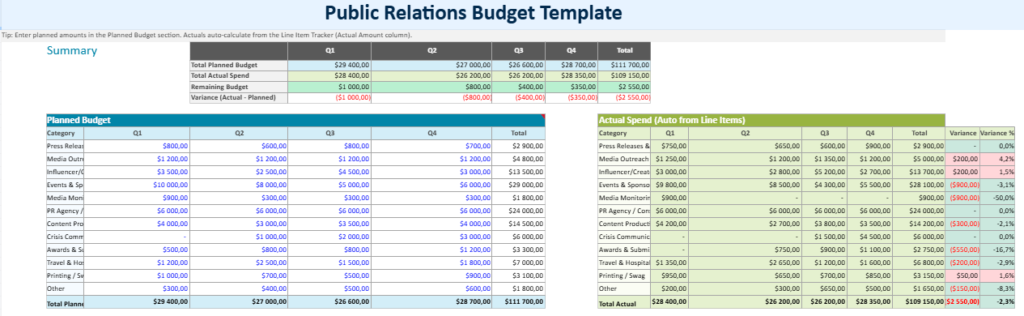
This pre-filled Public Relations Budget Template is designed as a ready-to-use budgeting workbook that looks and feels like an executive dashboard. Instead of starting from an empty grid, you open the file with realistic sample figures already entered, so you can immediately understand the logic, the categories, and the flow from planning to tracking—then replace the numbers with your own.
At the top, a Summary panel gives you the essentials at a glance: Total Planned Budget, Total Actual Spend, Remaining Balance, and Variance. The layout is intentionally visual, using a clear color hierarchy (planned inputs vs actuals vs totals) to make the status of the budget readable in seconds—ideal for leadership updates, weekly check-ins, or campaign reviews.
The workbook is structured around two practical pillars:
1) Planned Budget by category and period
The template comes pre-filled with PR-relevant categories (such as content production, media relations, events and protocol, monitoring tools, agency support, and digital amplification). Each category is distributed across the year by period (for example quarterly), which helps you anticipate spending rhythms instead of reacting to invoices late.
2) Actual Spend with a Line Item Tracker
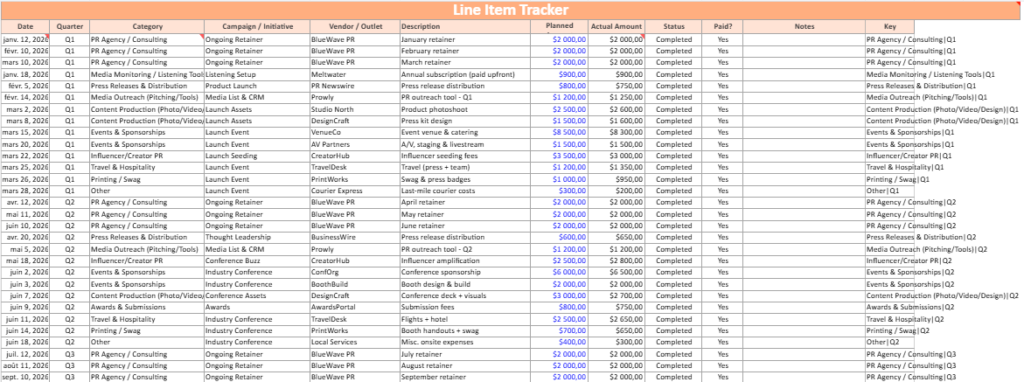
A dedicated Line Item Tracker is also pre-filled with sample transactions (date, vendor, initiative/campaign, category, planned amount, actual amount, and notes). This is where the template becomes operational: when you add real expenses, the totals update automatically and the dashboard reflects your real-time position.
Visual orchestration and built-in charts
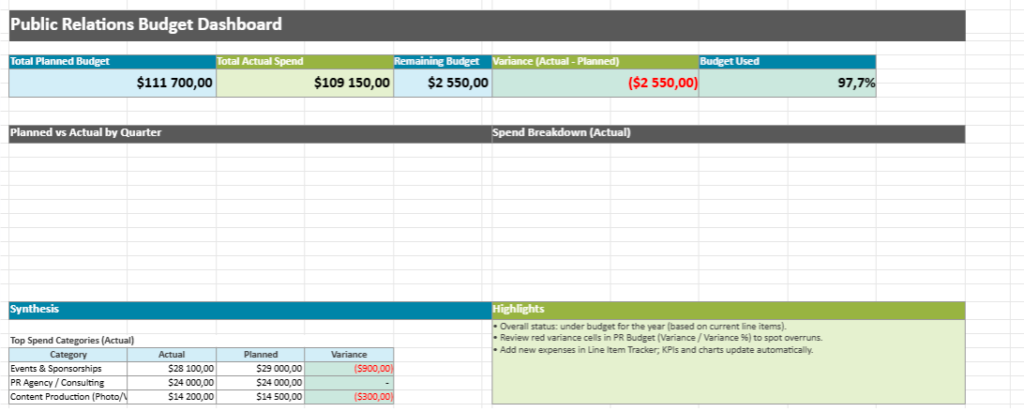
To make the results immediately understandable, the pre-filled version includes:
- A Pie Chart showing how actual spend is distributed by category
- A Planned vs Actual chart that highlights gaps, overruns, or underspending patterns
- Conditional formatting cues that draw attention to budget pressure points (for example, categories drifting over plan)
Why the pre-filled version matters
The pre-filled workbook shows you how a disciplined PR budget behaves when real expenses arrive. You can keep the structure, rename categories to match your organization, and scale the figures up or down—without rebuilding anything.