
Press Conference Schedule Template in Excel
The discipline behind a public moment
A press conference is rarely remembered for its spreadsheets, yet it is governed by them. Long before the first camera light turns on, the event has already been decided in a quieter arena: minutes allocated with restraint, responsibilities assigned without ambiguity, risks named before they become headlines, and a sequence arranged so that each gesture lands exactly where it should. In this sense, a press conference is less an announcement than a ceremony of clarity. The audience is the press, but the real witness is time.
A schedule, properly designed, does not merely list what happens. It protects what must happen. It prevents the voice from wandering, the message from dissolving, and the room from drifting into improvisation. It ensures that the institution speaks with steadiness, and that the day ends with the essential accomplished, not merely attempted.
This is the purpose of the press conference master schedule template: to translate intention into order, and order into composure.
Why the schedule is the first act of authority
Public communication is often judged by the words that are spoken. Seasoned teams know a more discreet truth: words do not carry unless the structure carries them. A press conference can fail without scandal, simply by losing rhythm. A delayed start breaks attention. A missing cue breaks confidence. An unclear ownership breaks execution. And in the press, execution is interpretation.
A well-built schedule does something elegantly simple. It makes time visible. It transforms the vague into the counted. It turns a plan into a sequence that can be rehearsed, measured, printed, and held in the hand. When each segment has a beginning, an end, an owner, and a status, the event stops depending on memory and starts depending on method.
That shift is not administrative. It is sovereign.
A master schedule designed as a command center
This template is structured as a small command center, built for the reality of event production: many moving parts, multiple stakeholders, and a short window where everything must align. It combines operational planning with communications governance, so that the run-of-show, the media list, the Q&A, logistics, and budget all speak to the same event instead of living in separate files and separate minds.
The logic is deliberate. A press conference is not one document; it is a system. The template reflects that system, with dedicated tabs that remain readable under pressure and printable when needed. Inputs are clearly separated from formulas, and critical fields use dropdowns so that status is consistent, trackable, and instantly understandable.
The run of show as the spine of the day
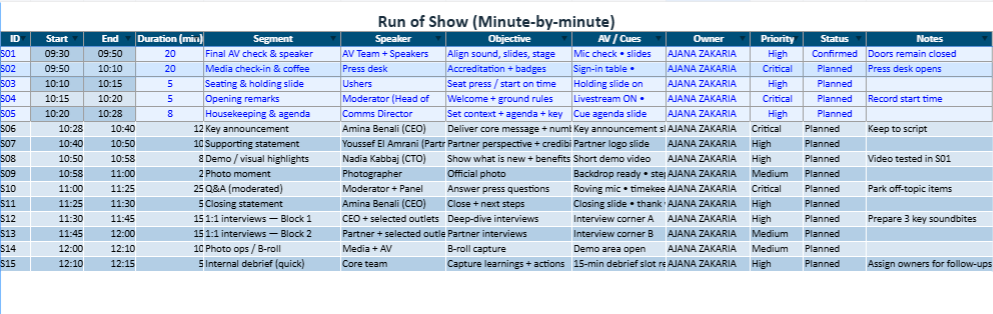
At the heart of the workbook sits the Run of Show, the minute-by-minute choreography. This is where the event becomes real. Each segment carries its own duration, which automatically shapes its start and end time. Change a duration once, and the entire sequence updates down the line. That is the power of a properly arranged model: one adjustment, one cascade, one truth.
This structure supports the practical discipline required in public moments. It helps a moderator stay on time without sounding rushed. It gives speakers a clear perimeter, which often improves their confidence. It gives the AV team the cues they need in the exact place they need them, rather than in a separate email thread at the worst possible moment.
The run-of-show tab is also designed to be managed, not admired. Priority and status fields allow a team to move from planning to confirmation, from rehearsal to execution, without losing visibility. When a segment is done, it is marked. When a segment is blocked, it is made visible early, while it can still be solved.
The printable planning sheet for day-of execution
Every event eventually reaches the same moment: the day-of briefing, when people stop reading long documents and start scanning for certainty. In that moment, the template’s Print Run Sheet becomes essential.
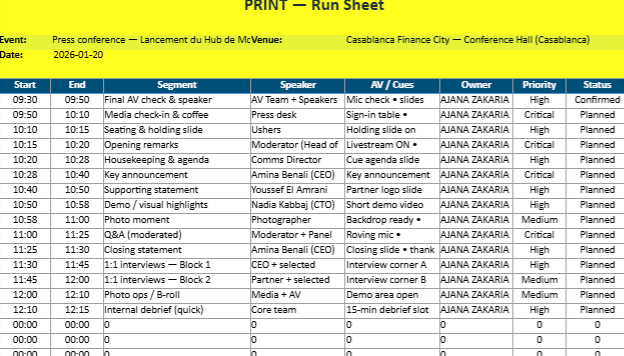
It is a clean, printable version of the schedule, built to be used on-site. It pulls the key elements from the run-of-show: timings, segment titles, speakers, cues, owners, and statuses. It is designed to be printed in landscape format and placed on a clipboard, a production table, or the front row. It reduces the schedule to what the room needs: a shared reference.
In disciplined teams, the print sheet is not a convenience. It is a common language. It prevents whispers, delays, and contradictory instructions. It makes coordination immediate, and that immediacy is what the press reads as professionalism.
Media RSVP as a controlled perimeter
A press conference is also a perimeter: who is invited, who is confirmed, who arrives, who requests follow-up, who asks the uncomfortable question. Media management succeeds when it is tracked with restraint and consistency, not with panic and last-minute improvisation.
The Media RSVP tab is designed for that reality. It allows teams to record outlets and contacts, track RSVP status in a standardized way, and mark accreditation, arrival time, pre-submitted questions, and follow-up needs. It becomes an operational register: a place where the room is known before the room is full.
This matters because the room shapes the event. A press conference with a handful of confirmed outlets needs a different rhythm than a press conference with strong attendance and multiple cameras. By tracking media status with precision, the team avoids surprises that alter the tone of the day.
Logistics as the invisible architecture
Many press conferences do not fail on the stage; they fail in the corridors. Badges are not ready. The backdrop is late. The microphone batteries are missing. The livestream is uncertain. None of these failures are dramatic, but each one erodes authority.
The Logistics tab is therefore built like a checklist with consequences. Tasks are assigned to owners, linked to due dates and times, and marked by priority and status. An overdue flag highlights what needs attention before it becomes a real problem. This is not a decorative feature; it is a discipline.
The quiet strength of this approach is that it makes accountability visible without confrontation. When an item is overdue, the file does not accuse anyone. It simply states the truth, early enough for the truth to be corrected.
Q&A preparation as institutional protection
There is a particular kind of silence that appears during Q&A when preparation is absent. It is not a scandal. It is a pause that feels like uncertainty, and uncertainty is contagious in a room full of reporters.
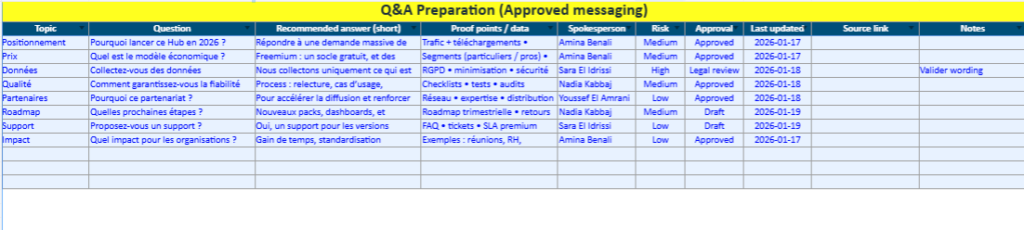
The Q&A tab is built to prevent that silence. It enables a team to define sensitive topics, craft recommended answers, attach proof points, assign spokespersons, and track approval status. It also introduces a simple but powerful discipline: risk classification.
Risk is not pessimism. It is composure. When a question is categorized and rehearsed, the speaker does not improvise under pressure; they respond within a prepared perimeter. The result is not rigidity. The result is a message that remains coherent even when challenged.
In institutions that understand public presence, Q&A is treated as part of governance. This template treats it the same way.
Budget tracking with the calm of numbers
A press conference is a public act, but it is funded by private decisions. The budget is the place where ambition meets reality. It is also where misunderstandings multiply: quotes, approvals, invoices, and payment status across multiple vendors.
The Budget tab keeps this reality orderly. It records categories, vendors, quantities, unit costs, and line totals, while tracking whether a line is planned, approved, invoiced, or paid. A summary block offers an instant view of total spend, paid total, and remaining amount.
This does not exist to impress anyone. It exists so that the team can make decisions with clarity instead of guesswork. In matters of public presence, clarity is a form of respect.
A timeline that prevents last-minute governance
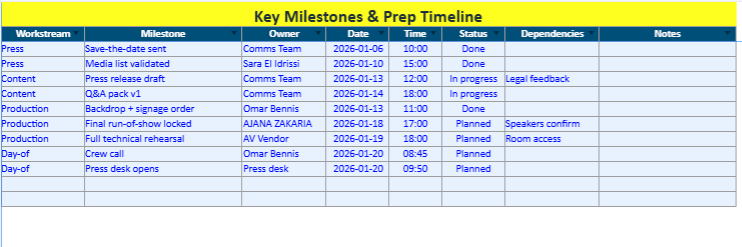
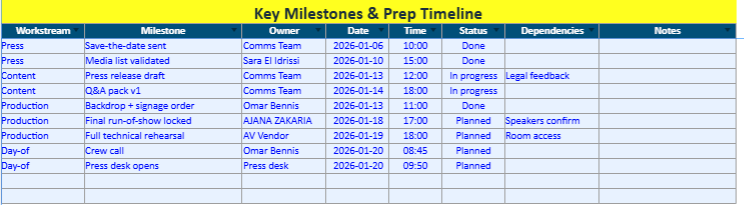
The most expensive part of event management is the last minute. It costs money, energy, reputation, and calm. The Timeline tab is designed to prevent that moment by placing milestones in sequence: save-the-date, media list validation, press release draft, rehearsal, and day-of crew call.
It is a simple structure, and that is its strength. It transforms preparation into a visible path. It also allows leadership to ask the right questions early: What is done, what is blocked, what requires a decision.
When a timeline is maintained, the event begins to feel inevitable. That sense of inevitability is often what the press reads as credibility.
How to use the template with dignity and efficiency
Begin with the Dashboard. Name the event, set the date, define the start time, and identify the venue and the primary spokesperson. These fields are more than administration; they become references across the workbook.
Then build the Run of Show. Start with the non-negotiables: doors, check-in, opening remarks, the key announcement, Q&A, and closing. Assign durations conservatively. A press conference gains authority when it ends on time.
Populate speakers and stakeholders next. Ensure bios, photos, and talking points are tracked early. Late content creates late decisions, and late decisions create improvisation.
Finally, treat logistics and Q&A as parallel pillars. Logistics protects the room. Q&A protects the message. When both are managed, the event holds its posture even when the unexpected occurs.
When the day arrives, print the run sheet. Use it as the shared reference. In a room where many people act at once, the printed page becomes the stabilizing object. It is modest, but it is powerful.
Prefilled Press Conference Schedule Workbook in Excel
A single file built to run the event
This prefilled Excel workbook is designed as an operational command book rather than a simple timetable. It centralizes what usually gets scattered across emails and separate documents: the event header, the minute-by-minute sequence, speaker readiness, media attendance, logistics deadlines, Q&A governance, budget control, and a printable run sheet for day-of execution. Everything is connected, so one update in the right place flows through the rest of the file.
Dashboard
The event’s cover page and control view
The workbook opens on a Dashboard already filled with core event details: event name, date, start time, venue, livestream placeholder, primary spokesperson, press kit placeholder, and the overall owner. This page functions like the front cover of a briefing binder: it establishes the reference information the team will use across the day.
Below the snapshot, the Dashboard displays key indicators pulled from the workbook: run-of-show volume, items completed, completion rate, overdue logistics, and media confirmations/attendance. It gives an instant reading of readiness before you open any operational tab.
Run of Show
The spine of the day, time-driven and automatic
The Run_of_Show sheet is prefilled with a complete sequence—from technical checks and media check-in to opening remarks, key announcement, supporting statements, demo highlights, photo moment, moderated Q&A, closing statement, and post-conference interview blocks.
The logic is time-driven: once the start time is set on the Dashboard, each segment’s start and end time is calculated automatically from its duration. Adjust one duration and the rest of the schedule cascades consistently. Each line includes cues, owner, priority, and status (via dropdown lists), keeping the run of show operational and easy to manage under pressure.
Print Run Sheet
Clean, landscape, day-of ready
The Print_RunSheet tab is the on-site version of the schedule. It pulls the essential information from the Run_of_Show and lays it out in a printable, landscape format: start time, end time, segment, speaker, cues, owner, priority, and status.
Because it is linked to the master schedule, it stays aligned automatically. Update the Run_of_Show once, and the printable planning sheet updates with it—no manual copy/paste, no last-minute formatting work.
Speakers
Readiness tracking, not just a contact list
The Speakers sheet is prefilled with realistic profiles and fields that matter in production conditions: name, title, organization, contact details, arrival time, on-stage slot, and readiness flags for bio, photo, and talking points.
This turns speaker preparation into something measurable. Instead of “we think we have it,” the file shows what is confirmed, what is missing, and what needs follow-up.
Media RSVP
Controlled perimeter and attendance intelligence
The Media_RSVP tab includes a sample press list with varied RSVP outcomes (confirmed, invited, no response, declined). It also tracks accreditation, dietary notes, arrival times, pre-submitted questions, and follow-up needs.
The structure is designed for reality: it lets the comms team see, at a glance, who is expected, who requires reminders, and where sensitivities may surface before the room fills up.
Logistics Checklist
Deadlines, ownership, and overdue visibility
The Logistics sheet is prefilled with concrete tasks: room layout confirmation, badge printing, livestream testing, roving mic preparation, backdrop installation, press release finalization, security coordination, catering, and press kit updates.
Each task includes owner, due date, due time, priority, and status. Items automatically flag as OVERDUE when the deadline has passed and the task is not marked Done. This is what makes the checklist act like a control mechanism rather than a static list.
Q&A Preparation
Messaging governed as an asset
The Q_and_A tab is already populated with plausible questions and recommended answers, proof points, spokesperson assignment, risk level, and approval status.
It treats messaging like governed content rather than improvised conversation. Approval stages (draft, legal review, approved) make it clear which answers are safe to use publicly and which still require alignment.
Budget Tracker
Numbers that stay readable
The Budget sheet contains sample lines for venue, AV, branding, hospitality, photo/video, PR support, and streaming. Unit costs and line totals are calculated, and a summary panel shows total budget, paid total, and remaining amount.
This keeps financial control visible without sending the team into a separate accounting workflow.
Timeline
Preparation sequenced, not rushed
The Timeline tab maps milestones leading up to the event—save-the-date, media list validation, press release drafting, run-of-show lock, technical rehearsal, and day-of crew call.
It prevents last-minute governance by making preparation a visible sequence, with status tracking that highlights what is done, what is blocked, and what depends on decisions.
In essence
A prefilled operational pack you can reuse immediately
The file is prefilled with realistic sample data so you can see the intended use immediately. Replace the sample information with your own, keep the architecture, and you have a single workbook that supports preparation, execution, and post-event follow-up—while keeping the event’s rhythm, ownership, and messaging under control.
Annual Media Plan Excel Dashboard Template with Budget Tracker and Quarterly Summary