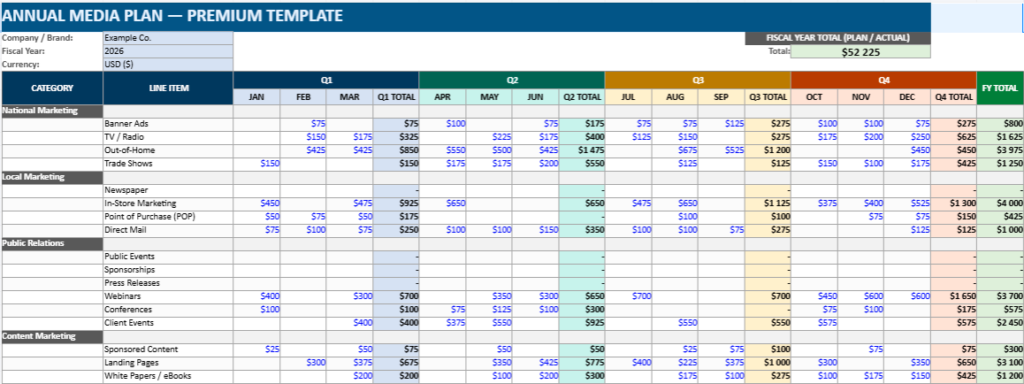
Annual Media Plan Excel Dashboard Template with Budget Tracker and Quarterly Summary
How an Annual Media Plan Becomes a Discipline of Power, Clarity, and Public Presence
There is a quiet truth in modern communications: visibility is rarely accidental. What looks spontaneous on the surface—an article that lands at the right moment, a campaign that feels inevitable, a message that travels farther than expected—usually rests on something far less glamorous: a plan. Not a vague intention, not a spreadsheet filled in once and forgotten, but a disciplined structure that forces choices, reveals priorities, and protects the institution from improvisation.
At The Kingdom of Decrees, we treat structure as a form of protocol. Protocol is not limited to flags and ceremonies; it is the grammar of public presence. A media plan, when built properly, becomes that grammar for communication teams. It defines who speaks, when, to whom, with what means, and at what cost—and it does so in a way that can be audited, defended, and improved.
The media plan is not administration
A plan is often mistaken for paperwork. In reality, it is governance. It is the act of deciding, in advance, where attention will be invested and where it will not. That decision alone changes outcomes, because budgets do not merely fund actions—they signal what matters.
An annual media plan forces an organisation to answer questions that otherwise remain unspoken:
- Which audiences truly justify investment?
- Which channels are strategic, and which are merely habitual?
- What is the rhythm of the year—its peaks, its diplomatic moments, its sensitive periods?
- Which initiatives deserve continuity rather than one-off bursts?
If protocol protects the dignity of institutions by standardising form, the media plan protects the coherence of communications by standardising intent.
A premium media plan behaves like a registry
The most reliable plans share a common feature: they read like a registry. They are not built to impress; they are built to operate. Categories are stable. Totals are explicit. Assumptions are recorded. Variances are visible. Owners are named. This is not aesthetics—it is control.
A premium media plan template should provide:
- A structured category hierarchy (e.g., National Marketing, Local Marketing, Public Relations, Content, Social, Partnerships).
- A quarterly architecture (Q1–Q4) that mirrors budget cycles and leadership reporting.
- Automatic totals (monthly, quarterly, annual), so the plan cannot hide its own arithmetic.
- A separate layer for actuals, because reality deserves its own column.
- A dashboard that turns numbers into decisions.
When these elements exist, the plan stops being an Excel file and becomes a management instrument.
Color is not decoration
In protocol, color is rarely random. It guides attention, encodes status, and reduces confusion in moments that require speed. The same logic applies to planning.
Quarter colors do more than make the sheet attractive. They create a visual rhythm: Q1 has a tone, Q2 another, Q3 another, Q4 another. At a glance, a decision-maker can see where effort concentrates, where the year is heavy, and where it is intentionally quiet.
Used well, color also separates:
- Inputs vs computed cells
- Planned vs actual spend
- Active campaigns vs placeholders
- Priority lines vs optional initiatives
Good design in planning is functional clarity. It is the opposite of noise.
The two-sheet principle: Plan and Actuals
One of the simplest upgrades that turns a template into a premium tool is separation. The plan is a declaration. Actuals are evidence. Mixing them on the same line too early leads to confusion and excuses.
A robust media plan system usually contains:
- Plan — what we intended to do
- Actuals — what we truly spent
- Variance — the disciplined comparison
Variance is not a problem; it is intelligence. It shows which channels underperformed in execution, which campaigns expanded, and which categories deserve recalibration next quarter.
Synthesis pages are where leadership lives
Most teams do the work inside the plan grid, but leadership wants synthesis. That is not vanity; it is the logic of governance. Executives do not manage individual rows; they manage signals.
A premium template therefore needs dedicated synthesis pages, such as:
- Monthly Summary: plan vs actual by month, plus year-to-date tracking
- Category Summary: spend distribution by category, with share of total budget
- Dashboard: KPIs, quarter totals, remaining budget, and pacing indicators
- Campaign Calendar: a high-level timeline that connects spend to moments and objectives
These pages do not replace the detailed plan. They translate it into a language that can be reported, approved, and defended.
Budget pacing is a form of discipline
In public protocol, timing is everything. In media planning, pacing is the same principle in financial form. A team that spends too much too early loses agility. A team that spends too late loses impact. The plan must therefore reveal not only totals, but tempo.
A good dashboard makes this immediate:
- % of budget spent year-to-date
- Remaining budget
- Quarterly distribution
- Month-by-month pacing
- Alert thresholds (e.g., overspend risks, under-delivery risks)
When pacing is visible, decisions become calmer. Teams move from reactive explanations to deliberate adjustments.
Planning without assumptions is theatre
Every plan rests on assumptions: CPM ranges, production costs, expected frequency, seasonal demand, internal capacity. If these assumptions are not written down, the plan becomes fragile. People argue about the numbers because the logic behind them is missing.
A premium media plan includes an Assumptions sheet that records:
- Cost benchmarks (by channel)
- Target audiences and priority markets
- Major launch windows
- Risk factors (holiday compression, procurement delays, political sensitivity, etc.)
- Performance expectations (reach, leads, engagement, conversions, depending on context)
This is where the plan becomes credible. Assumptions convert a spreadsheet into a narrative of intent.
The plan as institutional memory
A striking advantage of structured templates is that they preserve continuity. Staff changes, priorities shift, crises erupt. The plan remains a reference point that prevents communications from becoming a series of disconnected actions.
Over time, a well-maintained annual plan becomes institutional memory:
- It shows what was tried.
- It shows what was funded.
- It shows what was abandoned.
- It shows what repeated and therefore became a strategy.
In other words, it protects the organisation from forgetting itself.
A final note from The Kingdom of Decrees
The Kingdom of Decrees exists at the intersection of form and authority. We work with the idea that public presence is not simply a matter of expression; it is a matter of order. A media plan may appear operational, even mundane. But when it is built with discipline, it becomes a modern protocol: a system that makes communication measurable, coherent, and worthy of the institution it represents.
If you want your communications to travel farther, do not begin by shouting louder. Begin by structuring better. Order first. Then reach.
Download the Premium Annual Media Plan Template
A multi-color quarterly plan with automatic totals, plan vs actual tracking, synthesis pages, and a dashboard designed for executive reporting.
What’s inside this Premium Media Plan Excel Template
This isn’t the kind of spreadsheet you open once, admire for two minutes, and then abandon. It’s built to be used all year long — the place where your media budget actually lives, where decisions become visible, and where you can finally answer the question everyone asks sooner or later: Where is the money going, and what are we getting for it?
The workbook is designed like a complete planning system, not a single sheet. It gives you a clean annual plan, an “Actuals” layer to track real spend, and several summary pages that turn your numbers into something leadership can read in seconds.
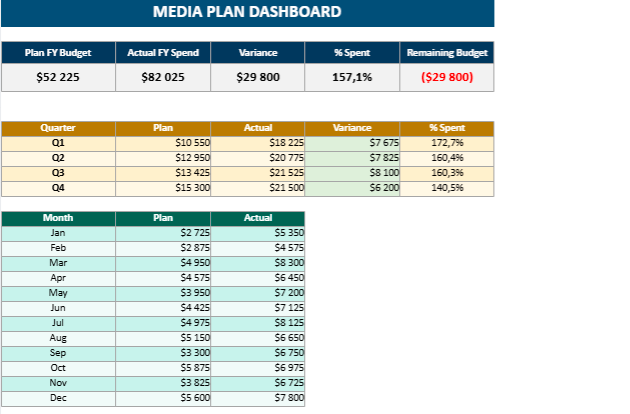
1) Dashboard
Think of this as the command center.
You get instant, high-level visibility on:
- Total planned budget
- Total actual spend
- Remaining budget
- Variance (over or under)
- Spend pacing across the year
It also breaks things down by quarter and by month, so you can see whether your budget is loading too heavily at the beginning, drifting too late into the year, or staying on a healthy rhythm.
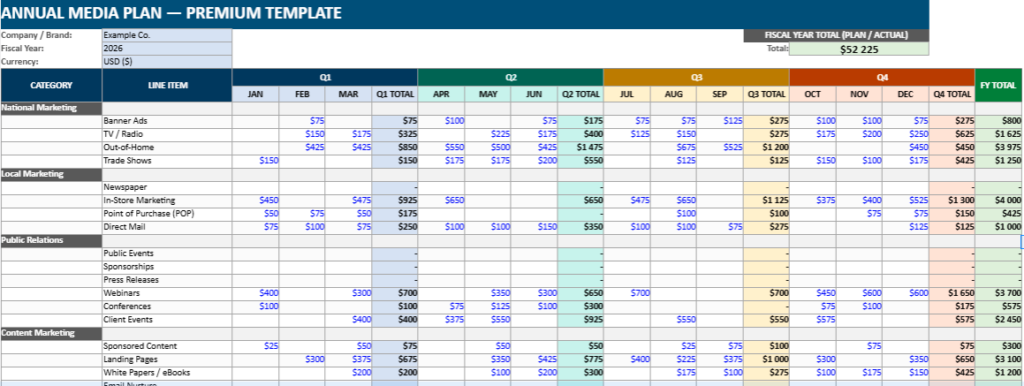
2) Plan
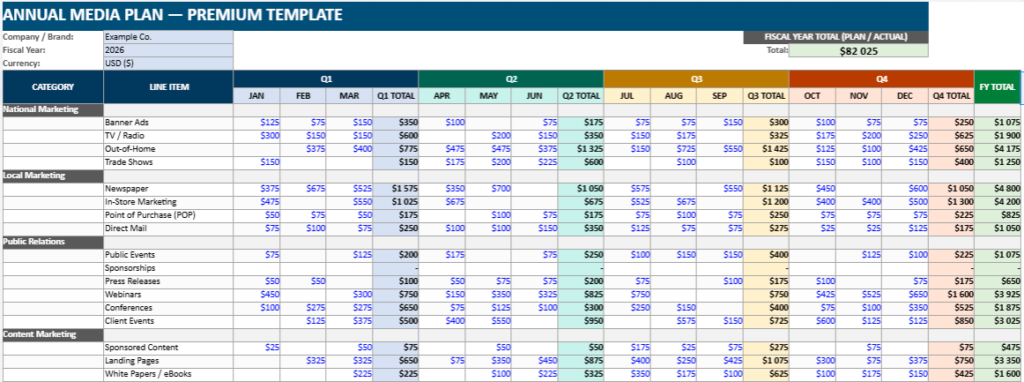
This is your annual media plan grid — built to mirror the classic structure teams already understand, but polished and more “executive-ready.”
What makes it premium:
- A clear quarter structure (Q1–Q4)
- Automatic totals by month, quarter, and year
- Category sections that make sense in real marketing teams (National Marketing, Local Marketing, Public Relations, Content Marketing, Social Media, etc.)
- A color system that helps you read the year at a glance (not just decoration — it’s visual navigation)
You fill the monthly cells, and the sheet does the math. No hidden tricks, no messy formulas scattered everywhere.
3) Actuals
This is where the file becomes truly useful.
Instead of rewriting your plan every time reality changes, you simply log what you actually spent. The structure matches the Plan sheet, which means you can compare “intent” vs “execution” without fighting the spreadsheet.
It’s the sheet that saves you in budget meetings, because it lets you answer questions with calm precision:
- “We planned $X for Q2, we spent $Y, and here’s why.”
- “This category went over, but this one under-delivered.”
- “We still have room for a campaign in September.”
4) Monthly Summary
If you want a clean pacing view, this page does it.
It aggregates totals automatically and gives you a month-by-month comparison between planned and actual, plus a year-to-date feel. This is the page you’ll use for regular reporting, because it tells the story of the year without drowning in line items.
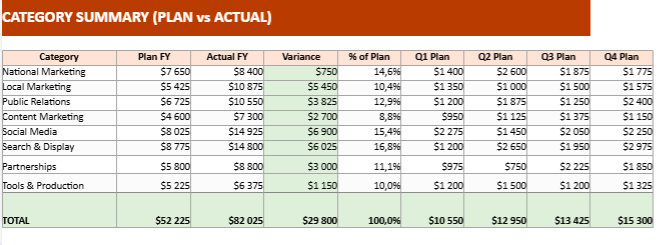
5) Category Summary
This is the strategic breakdown.
It answers the question: How is our budget distributed across major pillars?
You can see:
- Total plan by category
- Total actual by category
- Variance
- Share of total budget
It’s especially useful if your plan includes both paid media and non-paid initiatives, because you can see how much weight you’re putting into each domain.
6) Campaign Calendar
This one is simple but powerful: a timeline-style view where you can list your key campaigns, channels, and objectives.
It’s ideal for turning the budget into a narrative:
- What happens in March?
- What’s the summer push?
- Which quarter is brand-heavy, and which is conversion-heavy?
It also helps you spot overlaps before they become mistakes (two campaigns competing for the same audience at the same time, for example).
7) Assumptions
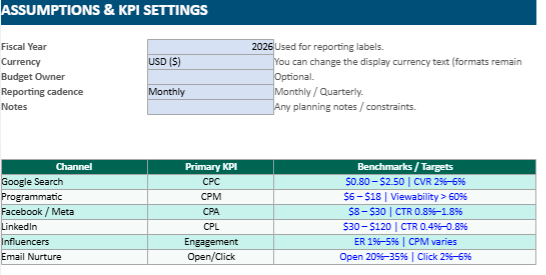
This sheet is the “why” behind the numbers.
It’s where you can record the logic that usually gets lost:
- your benchmarks
- your cost expectations
- internal planning notes
- target pacing rules
It makes the template feel serious, because it turns your plan into something defensible — not just a set of amounts in cells.
Built for people, not for spreadsheets
The real value of this file is that it reduces friction. It’s easier to plan, easier to track, easier to explain, and easier to update without breaking the structure.
Whether you’re building a yearly plan from scratch or cleaning up a budget that’s already running, this workbook gives you one place to manage the whole story — from the first allocation to the final year-end total.